Why Retailers Keep Buying Software and Still End Up in Excel
Retail data integration fails when software can’t match your own rules. See why retailers still end up in Excel and how connected data fixes it.

Retailers invest in specialised software to improve planning, manage inventory, and connect their operations. Yet many teams still rely on Excel to make decisions that span multiple systems. The problem often comes down to retail data integration. Each tool handles its own tasks, but the rules and exceptions that make a retailer’s operations different are harder to manage across those tools.
The gap becomes clear when a decision depends on data from several systems. Understanding where that gap appears, and how to address it, is a practical starting point.
The Promise of Specialised Retail Software
Retailers adopt software for good reasons. Each system takes over tasks that once required manual work and reduces the need for spreadsheets in specific areas.
A typical retail technology stack includes:
- A planning tool for merchandise and assortment
- A point of sale (POS) system for in-store transactions
- An e-commerce platform for online sales
- An enterprise resource planning (ERP) system for orders, finance, and stock
Each system has its own purpose. Problems tend to arise when a decision requires information from more than one of them. A planning tool might recommend an allocation based on historical demand, for example, while the inventory system reflects stock levels that have changed since the recommendation was generated.
The individual tools may work as intended, but the overall workflow still requires manual intervention.
Where the Automation Stops
Most retail software handles standard scenarios well. The difficulty comes when business conditions require a different response.
A new collection may need more stock in top-performing stores than a standard formula recommends. A store may have a local event coming up, or a supplier may deliver late. In these situations, a planner might export a report from one system, combine it with a stock file from another, and use Excel to decide what happens next.
The spreadsheet fills a gap in the existing workflow. It allows the team to apply business rules the connected systems don’t account for.
This approach can work, but it creates ongoing manual work. It also makes the process harder to maintain as data, products, and business requirements change.
Why Company-Specific Logic Matters
Every retailer has its own operating rules. These rules reflect how the business manages products, stores, suppliers, and inventory. Examples include:
- Flagship stores receive 40% of a new collection first.
- Top-performing stores must maintain at least two weeks of stock cover.
- Outlet stock is planned separately from regular retail inventory.
- Certain products can’t be marked down before a specified date.
These rules may be straightforward within one business, but they are difficult to apply consistently across separate systems. Standard software is designed to support common retail processes, while company-specific requirements often need additional configuration or custom logic.
As a result, these rules frequently end up in spreadsheets or depend on individual employees who know how the process works. When those employees leave or the process changes, maintaining that knowledge becomes harder.
Bringing these rules into a documented, repeatable workflow makes them easier to maintain and apply across the business.
The Retail Data Integration Problem
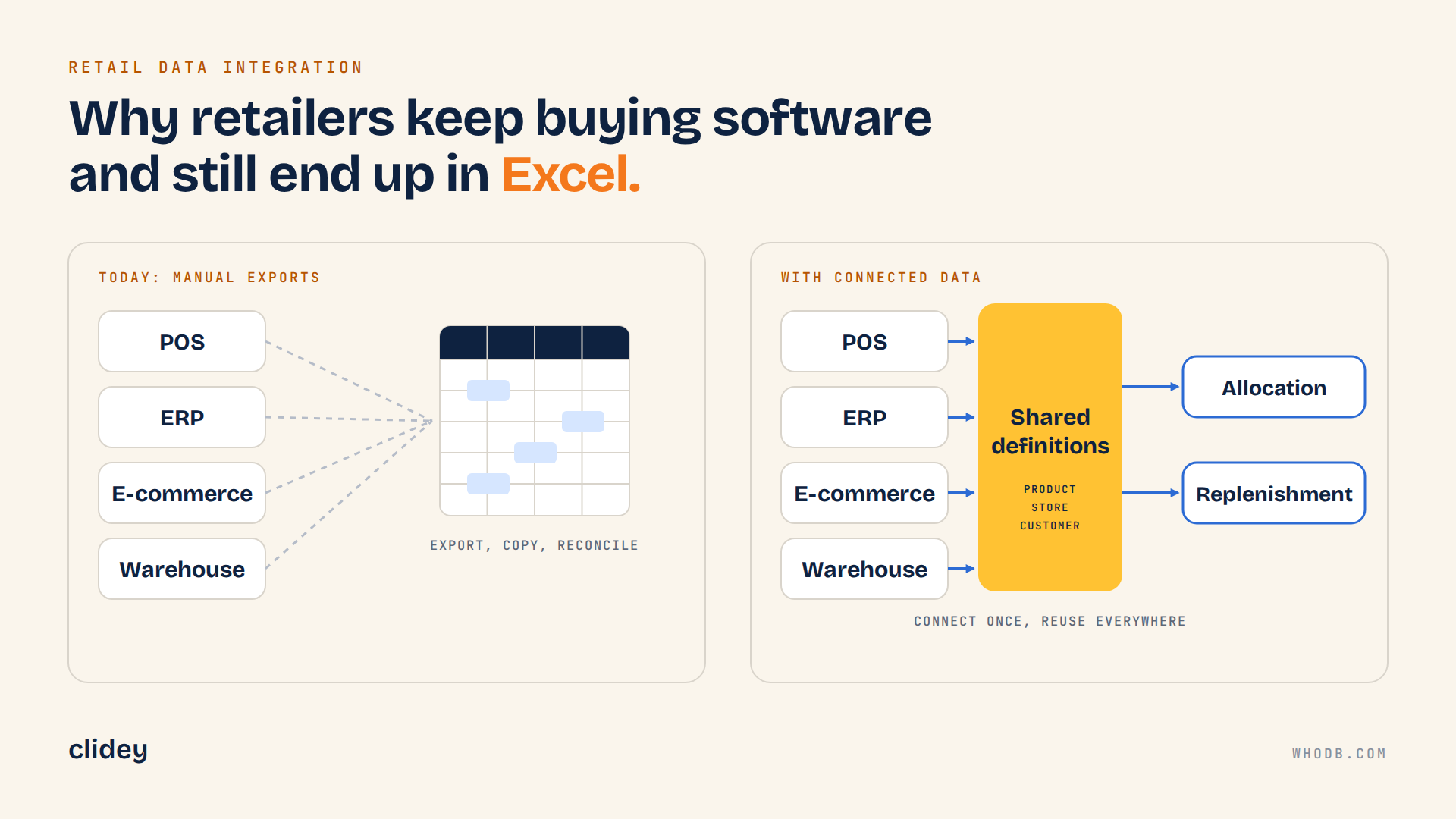
Retail data is spread across systems such as POS, ERP, e-commerce, and warehouse management platforms. Each system may represent the same business concept differently. A product identifier, for example, might be called item_id in one system, sku in another, and product_code in a third.
These differences make it harder to combine data and apply consistent business rules. We cover this challenge in our blog on retail data relationships data .
Traditional integration approaches can introduce further complexity. Point-to-point connections require maintenance when systems change, while consolidating data in a new warehouse can involve significant implementation work. In the meantime, teams continue exporting files and reconciling information manually.
The result is a gap between the data available in individual systems and the information teams need to make operational decisions.
How a Federated Data Layer Improves Retail Data Integration
A federated data layer connects data across existing systems without requiring all of it to be copied into a single new location. This approach draws on the federated database system model.
The next step is to establish shared definitions for business concepts such as Product, Store, and Customer. These definitions give teams a consistent way to understand and work with information from different sources.
For retail operations, this approach can help in several ways:
- Data stays in its source systems, so teams can work with connected data without automatically moving everything into a new repository.
- Business terms have agreed meanings, which reduces confusion when teams combine information from different systems.
- Teams can trace where a number came from and understand the transformations behind it.
- Before changing a table or data model, teams can check which downstream workflows or applications depend on it.
A federated approach doesn’t remove every integration challenge. Source compatibility, data quality, and the rules connecting different systems still need attention. Its value lies in making those relationships easier to understand and manage.
Building Applications Around Your Own Workflow
Once retail data integration is in place and the meaning of the data is clear, teams can build applications around their actual processes. Rather than adapting every task to a vendor’s standard interface, retailers can create tools for specific needs, such as allocation, replenishment alerts, or store-level planning.
This is where WhoDB fits into the workflow. WhoDB connects databases, warehouses, and files within a project, while helping teams explore data, model shared business concepts, trace lineage, and build workflows and applications. Teams can move from understanding their data to creating tools that use it. You can explore the WhoDB platform to see how these capabilities work together.
The Clidey ERP demo provides an example of this approach. It brings six applications for sales, CRM, point of sale, subscriptions, rental, and administration into one project. Each application supports a different operational need while remaining part of the same working environment.
Clidey Retail as an Example of Connected Retail Data
Clidey Retail is a worked example of a retail workflow on WhoDB. It follows orders from the point-of-sale register to the preparation queue, then into sales orders and customers. Store teams get one view of transactions and the work that follows each order.
The example uses rendered Clidey ERP demo apps with synthetic records, so no real customer data is shown. Typical inputs are products, orders, and customers. Connectors and setup depend on your systems, so treat it as an example pattern to adapt to your own data. You can see the retail workflow and the Clidey Point of Sale preview.
From Spreadsheets to Repeatable Planning
A separate case shows the same idea on a live planning workflow. A premium retailer was spending dozens of hours working with spreadsheets to allocate new collections, replenish top-performing stores, and consolidate stock. Allocation alone took three to four hours per product category each week.
With WhoDB, planners now begin with recommendations generated using their own business rules. They review the results, make adjustments where needed, and approve the decisions.
The change has reduced new collection allocation from three to four hours per category to 10 to 15 minutes. Replenishment alerts and stock consolidation suggestions also run automatically.
Planners remain responsible for the decisions. The software handles the calculations and repeatable parts of the workflow, leaving the team more time to review exceptions and apply its judgement.
You can read more about the inventory planning workflow.
Retail Data Integration FAQs
Why do retailers still use Excel?
Retail software handles standard processes, but company-specific rules and exceptions often require additional work. Excel becomes a practical way to combine data and manage decisions that existing systems don’t fully support.
What is retail data integration?
Retail data integration connects information from systems such as POS, ERP, e-commerce, and warehouse management platforms. The goal is to help teams work with consistent information across these systems.
What is a federated data layer?
A federated data layer connects existing data sources and provides a way to work with them through shared definitions, without requiring all the data to be copied into one central location.
Do retailers need to replace their existing software?
No. A data integration approach can work with existing systems, depending on which ones you use, so each tool keeps handling its intended tasks while the connections and business rules between them are managed more consistently.
How should a retailer get started?
Start with the spreadsheet the team relies on most. Identify the systems it draws data from, document the rules applied manually, and choose one workflow to make repeatable. This gives the team a defined starting point before expanding the approach to other processes.
Start With the Spreadsheet Your Team Relies On
Retail software can handle individual tasks well and still leave gaps between systems. Better retail data integration means connecting the data, documenting company-specific rules, and making recurring workflows easier to maintain.
Start with one spreadsheet your team uses every week. Identify the data it brings together, the decisions it supports, and the rules that still require manual work. That workflow can become the starting point for a more consistent approach to retail operations.
Explore WhoDB to see how connected data, shared business models, lineage, and applications can help teams build workflows around their existing systems.