Your Retail Data Has Tables. Your Business Has Relationships.
Retail data relationships link products, categories, stores, inventory, sales, and customers. Learn how to turn tables into business meaning.


Retail data relationships are the links between the things a retailer tracks: products, categories, stores, inventory, sales, customers, and collections. They show how one record connects to another, so a row in a table turns into something the business understands.
Most retail teams already have the tables. What they’re often missing is the map between them.
What Are Retail Data Relationships?
A table stores one kind of thing. A products table lists items. A stores table lists locations. Each row is a fact, but nothing in the row says how it connects to anything else.
Retail data relationships fill that gap. They say that a product belongs to a category, sits in stock at a store, and gets bought by customers. Engineers call the link between two tables a foreign key. The idea comes from the entity-relationship model, which has been used to design databases for decades.
A Product Isn’t Just a SKU
A SKU is a code. The product behind it has a whole story, and that story runs across your systems:
Product → Category → Store → Inventory → Sales → Customer → Collection
Each link answers a question someone on your team asks every week.
| Link | Question it answers |
|---|---|
| Product to Category | What kind of item is this? |
| Category to Store | Where do we sell this kind of item? |
| Store to Inventory | How much is on the shelf at each location? |
| Inventory to Sales | Is the stock selling through? |
| Sales to Customer | Who is buying it? |
| Customer to Collection | Which collections do they come back to? |
Why Tables Alone Hide Retail Data Relationships
Say a planner asks, “Which stores are running low on our best-selling winter collection, and who buys it most?”
To answer, someone has to join six tables. It gets harder because every system names things differently. The same product might be item_id in one place, sku in another, and product_code in a third. So analysts rebuild the same joins again and again, and two reports can still disagree.
It’s the same problem we covered in what a semantic ontology is: one word, different rules, different numbers.
How a Semantic Ontology Maps Retail Data Relationships
A semantic ontology writes down the things your business cares about and how they connect. You define Product, Category, Store, and Customer once, then map each one to the real tables behind it.
After that, a planner can ask a question in business terms, and the answer follows the links you already agreed on. Nobody has to remember which column holds the product code.
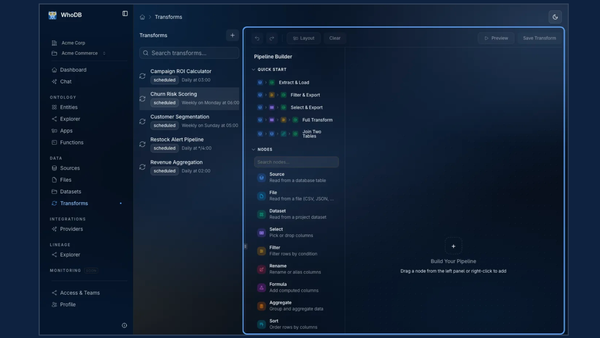
WhoDB’s modeling step is built for this. It gives tables meaning through shared entities, relationships, and context. Its lineage view then shows what depends on what, so a team can see the impact before anyone changes a table. You can see how it works across the WhoDB platform.
Retail teams are already putting this to work. One planning team now prepares an allocation plan in 10 to 15 minutes, down from 3 to 4 hours, starting from recommendations based on its own rules. You can walk through that inventory planning workflow to see how.
How to Start Mapping Retail Data Relationships
You don’t need a big project. Start with one question.
- Pick a question the business asks every week, such as which stores need restocking.
- List the things involved in the answer, like product, store, and inventory.
- Write down how they connect and which tables hold each one, even in a spreadsheet.
- Agree on one definition for each term, and review it every quarter.
A small map that your team actually opens beats a perfect one that sits in a folder.
Retail Data Relationships FAQs
What are retail data relationships?
They’re the links between retail records, such as products, categories, stores, inventory, sales, and customers. They show how one record connects to another, so a row in a table turns into something the business understands.
Why does retail data need relationships, not just tables?
Tables store facts but don’t say how those facts connect. Without the links, a simple question like “which stores need more of this collection?” means rebuilding joins by hand, and two reports can give different answers.
Is this the same as a database schema?
No. A schema describes how tables are built, including columns, types, and keys. Retail data relationships add business meaning on top, such as a customer buying a product from a store. A merchandiser can read the second one, but usually not the first.
What is a semantic ontology in retail?
It’s a shared map of business terms and how they connect. In retail, it defines things like Product, Store, and Customer once, then maps each one to the tables behind it. Our post on what a semantic ontology is covers the basics.
Which retail questions get easier when the data is connected?
Questions that cross several tables. Which stores are low on a best-selling collection? Is the stock selling through? Who buys this category? Which collections bring customers back?
Who should own retail data definitions?
Merchandising and planning teams should define what each term means, and data teams should handle the technical mapping. Nobody needs SQL to agree on a definition.
How does WhoDB help with retail data relationships?
WhoDB gives tables meaning through shared entities, relationships, and context. Product, Store, and Customer connect to the data behind them, so teams can see how things link. You can see how this works on the WhoDB platform page.
Can WhoDB connect data that lives in different systems?
Yes. WhoDB brings databases, warehouses, and files into one project and keeps the origin of each source in view. That helps when product, inventory, and sales data sit in separate systems, which is common in retail. See the integrations.
What does data lineage add for a retail team?
Lineage shows what depends on what. Before anyone changes a table or renames a column, the team can see which datasets, reports, and apps rely on it. That means fewer surprises when something changes.
How can a retail team get started with WhoDB?
Start with one question the business asks every week, then map the data behind it. WhoDB is available as WhoDB Cloud or as a Managed Private deployment, and you can start free or read the documentation. For a retail example, see the inventory planning workflow, where one planning team now prepares an allocation plan in 10 to 15 minutes, down from 3 to 4 hours.
Start With One Product Question
Your tables already hold the facts. The relationships turn them into answers. Pick one product question your team keeps asking, map the links behind it, and build from there. To see how teams do this with lineage and shared entities, explore WhoDB.