
Visual Data Pipeline Builder vs. SQL: Why WhoDB Made the Switch
Why WhoDB replaced handwritten SQL with a visual data pipeline builder. Faster ETL, fewer errors, and pipelines anyone on the team can read.

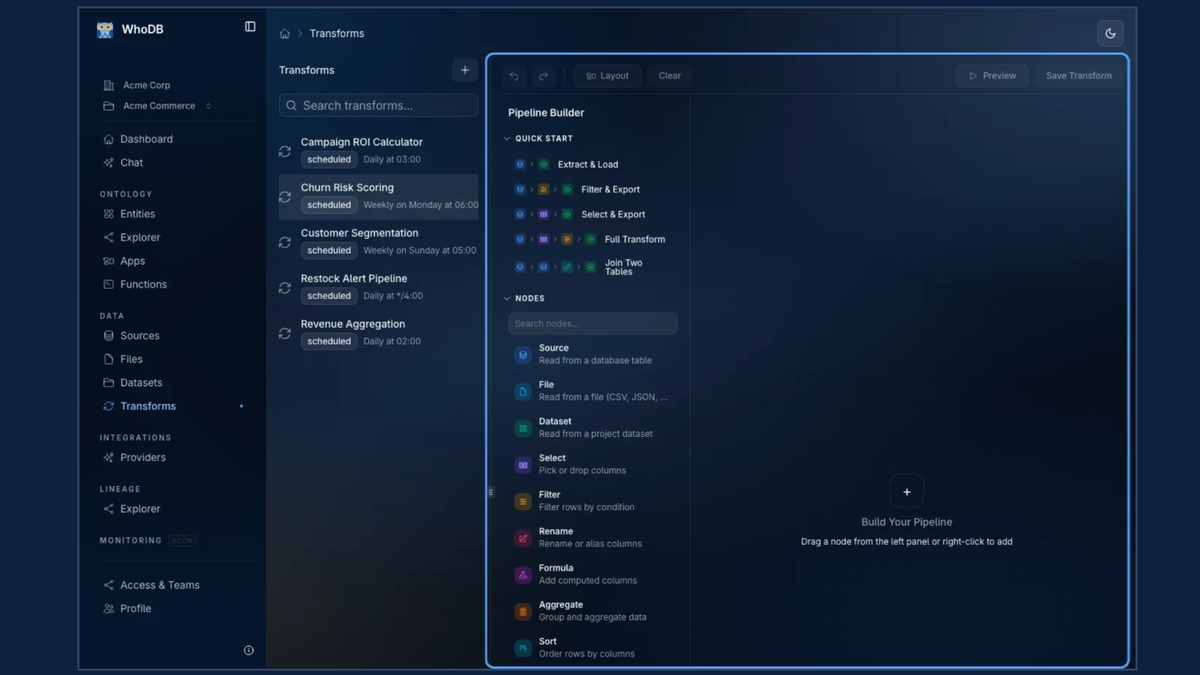
Why We Built WhoDB's Visual Data Pipeline Builder Instead of Writing More SQL
For years, the default way to move and transform data was the same: open an editor, write another SQL script, schedule it with cron, and hope nobody touches it again. It works, right up until the person who wrote the script leaves, the source schema changes, or someone new on the team needs to understand what a 400-line query actually does. That's the exact problem WhoDB's visual data pipeline builder solves, and it's why we built it into the platform instead of asking teams to write even more SQL.
The Problem With SQL-Only Pipelines
SQL is a great language for querying data. It's a much weaker tool for documenting a pipeline. A stored procedure or dbt model can encode a genuinely complex chain of joins, deduplication logic, and enrichment steps, but none of that logic is visible unless you're already comfortable reading it. That creates a few recurring problems:
- Only engineers can safely edit the pipeline, so every change becomes a ticket.
- Nobody can see the pipeline's shape at a glance. You have to read line by line.
- Debugging a broken run means re-running the whole script to find where it failed.
- Onboarding a new analyst takes weeks, because the business logic is buried in code.
SQL is fine as a query language. The real limitation is treating it as the only interface for a workflow, a sequence of steps with inputs, transforms, and outputs. Workflows benefit from being seen, not just read. That's the thinking behind WhoDB's approach to ETL.
What Is WhoDB's Visual Data Pipeline Builder?
WhoDB's visual data pipeline builder replaces hand-written scripts with a drag-and-drop, node-based canvas: source, transform, destination. Each step in the pipeline is a visible block instead of a paragraph of code, so you can look at a pipeline in WhoDB and immediately understand what it does: pull from Postgres, deduplicate, validate against a schema, enrich with an AI classification step, and write to a governed dataset.
WhoDB's visual data pipeline builder adds several things raw SQL scripts don't give you for free:
- You can describe a step in plain English with WhoDB's AI-assisted transform generation and get a working transform instead of writing it by hand.
- You can preview sample output at each node before running the full pipeline.
- Pipelines run manually, on a schedule, or triggered by a data change, cron-based or one-click.
- Every run leaves a full history inside WhoDB: success and failure tracking, retry policies, and execution time per step.
- Version history lets you roll back a pipeline the same way you'd roll back code.
Visual Data Pipeline Builder vs. Writing Raw SQL
| Hand-written SQL scripts | WhoDB's visual data pipeline builder | |
|---|---|---|
| Who can build one | Primarily SQL-capable users | Analysts, engineers, and ops teams can work with the visual workflow |
| How you debug | Re-run queries and inspect logs | Inspect the relevant pipeline node and run history |
| How you review a change | Read the code or diff | See the pipeline structure and version history |
| Documentation | Comments and separate documentation | The pipeline structure makes the workflow visible |
| Adding an AI step | Custom code and API wiring | Add an AI-assisted transform or AI step |
Under the hood, WhoDB's visual data pipeline builder still runs SQL. The difference is that the logic is organised into inspectable, reusable steps instead of one long, opaque script.
How the WhoDB Agent Makes the Pipeline Builder Even Faster
The other reason we leaned into a visual data pipeline builder is AI. When a pipeline is broken into discrete steps, the WhoDB Agent can reason about each one: suggesting a transform, validating a schema before a write happens, or building an entire pipeline from a plain-English request like "combine our CRM, order, and analytics data into one customer record, deduplicated and validated."
That's a meaningfully different workflow than asking someone to write a 400-line SQL script from scratch. The AI-assisted approach inside WhoDB's visual data pipeline builder typically includes:
- Natural-language pipeline generation lets you describe the outcome you want and get a draft pipeline back.
- Schema validation before writes means the WhoDB Agent checks for drift, missing columns, or type mismatches before anything hits a downstream dataset.
- AI transform steps run inline: classification, enrichment, or scoring functions that call a model as part of the pipeline itself, not as a separate script.
- Ongoing monitoring flags failed runs or schema drift before they reach a downstream dashboard.
A Real Example: Building a Customer 360 View in WhoDB
Here's a concrete case that shows the difference. Say you need a unified customer_360 dataset built from three separate sources: a Postgres CRM, a MySQL orders database, and a Snowflake analytics warehouse.
Written as SQL, that's a multi-file project: extraction queries per source, a deduplication script, a validation step, an enrichment job, and a merge, each one a separate file someone has to maintain and re-run in the right order.
In WhoDB's visual data pipeline builder, that same job is four connected nodes: Deduplicate → Validate → Enrich → Merge, with the sources plugged in at the top and a governed, PII-marked dataset coming out the bottom. Anyone on the team, not just the person who wrote it, can open that pipeline in WhoDB and understand exactly what happens to the data, in order, without reading a single line of code.
Lineage and Governance Matter More Than People Expect
Once you have pipelines instead of scripts, you also get something scripts rarely give you cleanly: lineage. WhoDB's visual data pipeline builder tracks source, transform, dataset, and downstream ontology entity, so you can answer questions that used to take hours of grepping through code:
- What breaks if this column changes?
- Where does this PII field actually flow?
- Which pipelines are dead weight, feeding nothing?
- Who last touched this dataset, and when?
For regulated teams, that's often the actual reason to move off ad-hoc SQL in the first place. Data contracts, access controls, and audit trails are far easier to attach to a pipeline with defined, visible steps than to a folder of loose .sql files, and WhoDB builds all three into the platform.
When You Still Need SQL
To be clear, WhoDB's visual data pipeline builder doesn't make SQL obsolete. Complex, one-off analytical queries, ad-hoc exploration, and highly custom transform logic still often live better in raw SQL or a WhoDB serverless function. The goal is to stop using SQL as the only way to build something that's fundamentally a repeatable, shared workflow. WhoDB lets you drop into a code or function node for the genuinely hard 10% and keep the visual layer for the other 90%.
From SQL Scripts to Pipelines Anyone Can Read
Writing more SQL scripts doesn't scale as your team grows. It scales only with the number of people willing to read someone else's 400-line query. WhoDB's visual data pipeline builder turns that logic into something the whole team can see, run, debug, and trust, and layering the WhoDB Agent on top of it cuts the time from "raw data" to "governed, usable dataset" from weeks to hours. If your pipelines are still living entirely in .sql files and cron jobs, that's usually the clearest sign it's time to look at WhoDB's visual data pipeline builder instead.